

FxPro App for iPhone and iPad
Access FxPro from an iPhone or iPad, explore mobile trading features and follow the official FxPro download route.
Visit FxPro for the iOS App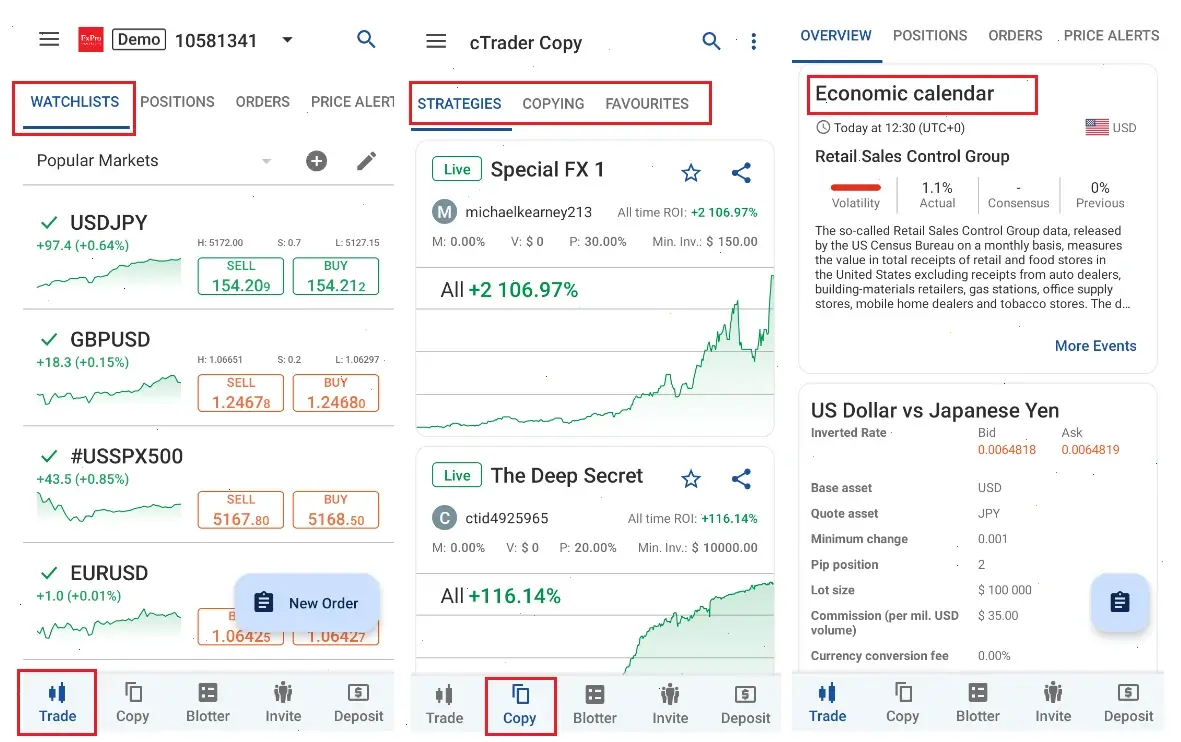
The FxPro website provides current information about its iOS application, supported functions and available download options. Starting there also makes it easier to identify the correct app for your account and Apple device.
On this page
What Is the FxPro App for iOS?
The FxPro iOS app is the broker’s mobile application for compatible iPhones and iPads. It brings together trading functions, account management, funding tools, market information and support access in one interface.
The application is different from MetaTrader 4, MetaTrader 5 and cTrader Mobile. Those apps provide direct access to a particular trading platform, while the FxPro app also covers the wider management of the client profile and connected accounts.
Available functions can depend on the account type, trading platform, registered jurisdiction, device and current application version.
Explore the FxPro iOS AppFxPro App Features for iPhone and iPad
The iOS application is designed for users who want to access markets, monitor positions and manage their FxPro profile away from a desktop computer.
| Feature | What it can be used for |
|---|---|
| Mobile trading | Open, monitor, modify and close supported positions from an iPhone or iPad. |
| Price charts | Review market movements and use available charting and analytical tools. |
| Account management | Create, access and review compatible real and demo accounts. |
| FxPro Wallet | Review balances and make supported transfers between the Wallet and trading accounts. |
| Deposits and withdrawals | Access the funding methods currently available for the registered profile. |
| Demo trading | Use virtual funds to practise order placement and explore app functions. |
| Market information | Review scheduled events, market updates and available analytical content. |
| Notifications | Receive enabled account, market or price alerts on the Apple device. |
| iPad support | Use a larger workspace for charts, account information and order management. |
The mobile format is useful for monitoring positions and responding to market movements while away from a desktop. A computer may still be more convenient for detailed analysis, multiple charts and advanced platform tools.
How to Download the FxPro App for iPhone or iPad
Users can begin from the FxPro website, review the current iOS app information and follow the download option provided for their Apple device and location.
1. Visit FxPro
Use the button on this page to continue to the FxPro website.
2. Find the Mobile App
Open the application or platform download section and select the iOS option.
3. Review the App Details
Check the application name, developer, compatibility and current version information.
4. Start the Download
Follow the instructions displayed for the iPhone or iPad.
5. Install the App
Confirm the installation using the Apple ID, Face ID, Touch ID or device passcode where required.
6. Register or Log In
Create a new FxPro profile or access an existing account.
FxPro also provides iOS versions of MT4, MT5 and cTrader. Check which platform is connected to the trading account before choosing an application.
Visit FxPro to Download the iOS AppFxPro iOS Requirements and Compatibility
App availability and performance can depend on the iOS or iPadOS version, device model, available storage, memory and regional settings.
Before Installing
- Install available iOS or iPadOS updates.
- Check that the device has sufficient free storage.
- Use a stable Wi-Fi or mobile-data connection.
- Confirm that the device date and time are correct.
- Review the latest compatibility information before downloading.
- Check that the Apple ID is active on the device.
iPhone and iPad
The application can be used on compatible iPhones and iPads. An iPad may provide more space for charts, account values, market information and order controls.
Actual performance depends on the device. Older hardware, limited storage or an unstable connection may affect chart loading, price updates and order-screen responsiveness.
How to Register for the FxPro iOS App
New users can create a FxPro profile and then access the iOS application using the credentials registered with the broker.
- Visit FxPro through the button on this page.
- Open the registration form.
- Enter an active email address and create a password.
- Add the requested personal and contact details.
- Complete the required identity and residency checks.
- Create a real or demo account.
- Select the preferred trading platform and account settings.
- Open the iOS app and access the registered profile.
Registration requirements, account options and available services can vary according to the FxPro entity serving the client.
How to Log In to the FxPro App on iPhone or iPad
The FxPro app normally uses the email address and profile password connected to the user’s FxPro registration.
These credentials are different from the account number, trading password and server information used inside standalone MT4 or MT5 applications.
| Application | Typical login details | Main purpose |
|---|---|---|
| FxPro iOS App | Email address and FxPro profile password | Profile, account, funding and supported trading functions |
| MT4 for iOS | MT4 account number, password and server | Direct access to an MT4 trading account |
| MT5 for iOS | MT5 account number, password and server | Direct access to an MT5 trading account |
| cTrader for iOS | Compatible cTrader login details | Direct access to a cTrader trading account |
If the FxPro Password Is Forgotten
Use the password-recovery option connected to the FxPro profile. Do not repeatedly enter an MT4 or MT5 trading password into the main FxPro profile login form.
For more information about profile and account access, see the FxPro login page.
How to Trade with the FxPro iOS App
After accessing a supported account, users can select an instrument, open its chart or order ticket and enter the required trade settings.
- Select a supported market or instrument.
- Open the chart or trading ticket.
- Choose the required order type.
- Enter the position size.
- Review the current price and estimated margin.
- Add stop-loss or take-profit levels where required.
- Select Buy or Sell.
- Monitor, modify or close the position from the account area.
The exact instruments and trading conditions depend on the account type, platform and jurisdiction.
FxPro iOS App vs Desktop Platform
| Feature | iOS app | Desktop platform |
|---|---|---|
| Mobility | Designed for iPhone and iPad | Designed for desktop or laptop use |
| Notifications | Mobile alerts may be enabled | Depends on the selected platform and settings |
| Chart workspace | Adapted to a mobile screen | More space for multiple charts and windows |
| Manual trading | Supported | Supported |
| Advanced indicators | More limited by the mobile interface | Better suited to advanced analysis tools |
| Automated trading | Limited compared with desktop platforms | More suitable for platform automation tools |
Managing FxPro Accounts on iOS
The FxPro app can provide access to profile information, account balances, available trading accounts and selected account-management functions.
- Review real and demo accounts.
- Check account numbers and platform types.
- Monitor balance, equity and margin information.
- Access available account settings.
- Review transaction and transfer information.
- Contact support through the available communication options.
Users managing several accounts should check the selected account before opening a position or transferring funds.
Deposits and Withdrawals in the iOS App
The FxPro app includes access to supported funding and account-transfer functions. Payment methods can vary according to the client’s country, account status, currency and FxPro entity.
- Deposits: view the funding options currently enabled for the profile.
- Internal transfers: move eligible funds between the FxPro Wallet and trading accounts.
- Withdrawals: submit and monitor supported withdrawal requests.
- Currency conversion: review any displayed exchange rate before confirming a transfer.
For more information about available payment options, processing times and possible charges, see FxPro deposit methods.
FxPro Demo Account on iPhone and iPad
A demo account allows users to explore the iOS application and practise trading with virtual funds before moving to a live account.
Demo trading can help users become familiar with charts, order types, position sizes and account navigation. It does not remove the risks associated with live trading and may not reproduce every condition of a real account.
See the FxPro demo account page for more information about registration and available platforms.
FxPro iOS App Availability and Apple ID Region
App availability may depend on the country assigned to the Apple ID, the device model, the current operating-system version and regional application settings.
A user travelling or using an Apple ID registered in another country may see different application availability from a user whose account is registered locally.
Before Changing the Apple ID Region
- Review the current app information through FxPro.
- Check whether the application is compatible with the device.
- Confirm that the Apple ID region matches the intended country.
- Remember that changing the Apple ID region can affect subscriptions and stored account balance.
- Avoid changing regional settings solely on the basis of an unofficial download page.
FxPro iOS App in South Africa
South African users can access FxPro to review the current iPhone and iPad application, compatibility information and account functions available for their profile.
Available markets, account conditions, leverage and payment methods depend on the FxPro entity serving the client and the type of account selected.
App availability may also depend on the Apple device, operating-system version and Apple ID regional settings.
FxPro iOS Installation and Login Problems
The App Is Not Available on the Device
- Check whether the iOS or iPadOS version is supported.
- Review the available device storage.
- Install pending operating-system updates.
- Check the Apple ID and device regional settings.
- Review the current download information on FxPro.
The App Will Not Install
- Free additional storage space.
- Restart the iPhone or iPad.
- Check the internet connection.
- Confirm that the Apple ID is signed in.
- Install pending iOS or iPadOS updates.
The FxPro Login Is Not Working
- Confirm the registered email address.
- Check the FxPro profile password.
- Do not use MT4 or MT5 account credentials in the main profile login form.
- Use password recovery when necessary.
- Check that the internet connection is stable.
Charts or Prices Are Not Loading
- Switch between Wi-Fi and mobile data.
- Close and reopen the application.
- Install the latest available app version.
- Check whether the selected market is open.
- Restart the device if the problem continues.
Notifications Are Not Appearing
- Allow notifications in iOS settings.
- Review notification preferences inside the app.
- Check whether Focus mode is suppressing alerts.
- Confirm that background app refresh is enabled where required.
How to Use the FxPro iOS App Safely
- Review the current application details before installation.
- Check the app name and developer information.
- Keep iOS, iPadOS and the FxPro app updated.
- Protect the device with a passcode, Face ID or Touch ID.
- Do not share profile or trading passwords.
- Avoid logging in through unsecured public Wi-Fi.
- Review application permissions.
- Do not enter credentials into similarly named unofficial applications.
- Use the support options displayed on the FxPro website or inside the app.
FxPro App for iOS FAQ
- Is the FxPro app available for iPhone?
- FxPro provides an iOS application for compatible iPhones. Availability can depend on the device, operating-system version and regional settings.
- Can I use the FxPro app on an iPad?
- The application may be used on compatible iPads, providing more screen space for charts, account information and trading controls.
- Where can I download the FxPro iOS app?
- Use the button on this page to visit FxPro, review the current iOS app information and follow the download option provided for the device.
- How do I log in to the FxPro iOS app?
- Use the email address and profile password connected to the FxPro registration. Standalone MT4 and MT5 applications use separate trading-account credentials.
- Can I register through the iOS app?
- FxPro provides mobile registration and account-management functions. The exact steps and requirements depend on the client’s jurisdiction.
- Can I trade from the FxPro iOS app?
- The app provides supported mobile trading, charting and order-management functions. Available instruments depend on the account and region.
- Can I use a demo account?
- Users can access supported demo trading functions and practise with virtual funds before using a live account.
- Is the FxPro app the same as MT5 for iPhone?
- No. The FxPro app is the broker’s own application, while MT5 for iPhone is a separate MetaTrader platform for compatible MT5 accounts.
- Can I manage deposits and withdrawals in the app?
- The FxPro app provides access to supported fund-management functions. Available payment methods depend on the profile, currency and jurisdiction.
- Why is the FxPro app not available on my iPhone?
- Possible reasons include device incompatibility, an outdated iOS version, insufficient storage or Apple ID regional settings.
- Does the Apple ID country affect app availability?
- It can. Application availability may differ according to the country or region connected to the Apple ID.
- Is the FxPro iOS app available in South Africa?
- South African users can visit FxPro to review current iPhone and iPad availability, compatibility and account conditions.
Risk warning: CFDs are complex instruments and involve a significant risk of losing money rapidly due to leverage. Consider whether you understand how CFDs work and whether you can afford to take the risk of losing your money.
This website is an independent informational and partner resource and is not the official FxPro website. Buttons redirect users to FxPro, where current iOS compatibility, application information and download options can be reviewed. The content does not constitute investment advice.