

FxPro WebTrader: MT4 & MT5 Web Terminal
Access your FxPro trading account through a browser, analyse markets and manage MT4 or MT5 trades without installing desktop software.
Open FxPro WebTrader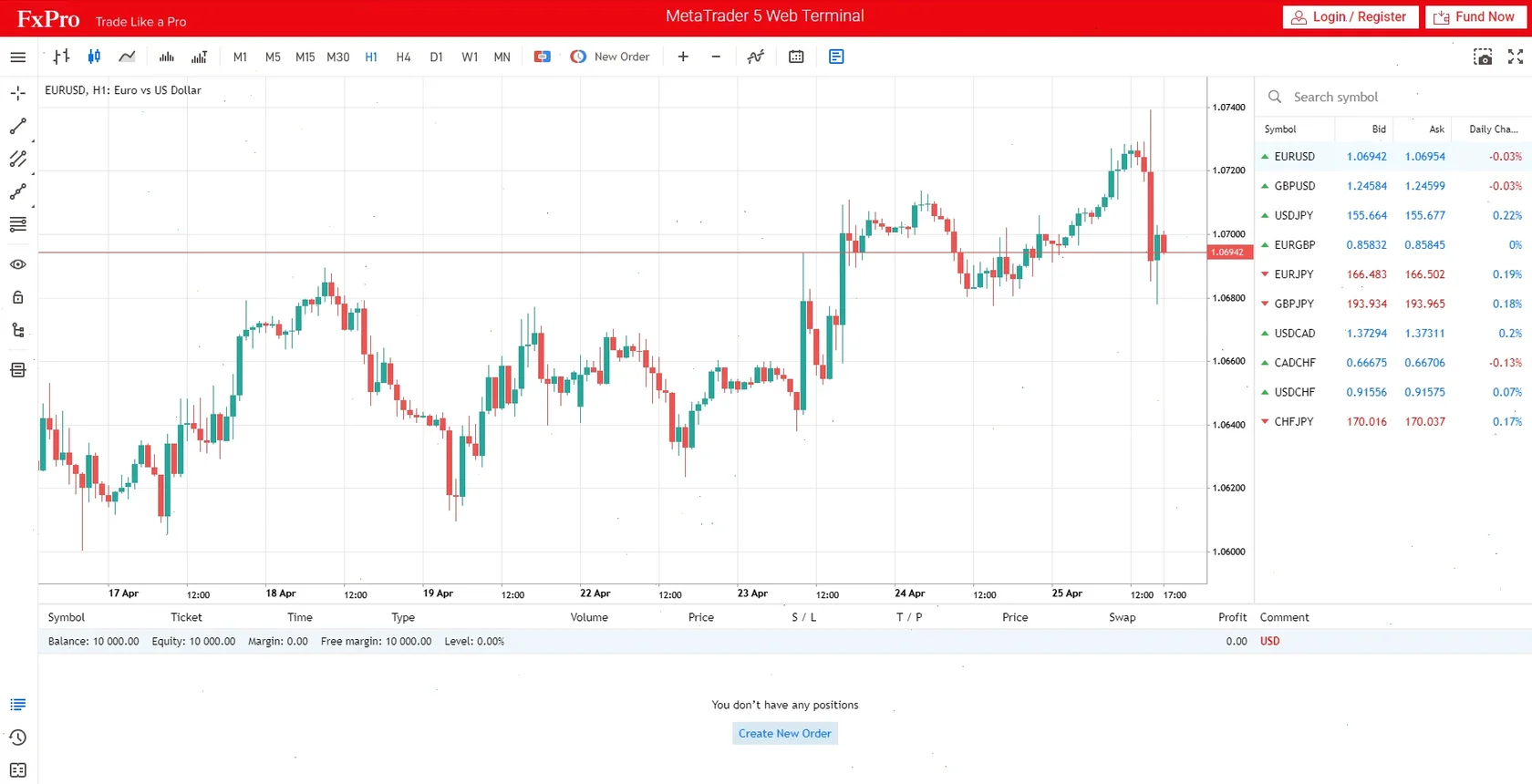
On this page
What Is FxPro WebTrader?
FxPro WebTrader is a browser-based trading platform that provides access to a compatible FxPro trading account without requiring a desktop installation. It can be useful when trading from a different computer, using macOS or checking an account from a device where installing software is not practical.
Depending on the account selected, traders can access an FxPro web platform, MT4 WebTrader, MT5 WebTrader or the browser version of cTrader. The available instruments, account conditions and platform functions depend on the account type and trading technology being used.
Important: FxPro Direct and FxPro WebTrader serve different purposes. FxPro Direct is used to manage profiles, accounts, deposits and withdrawals. WebTrader is used to view prices, analyse charts and place or manage trades.
What can be done through the web terminal?
- View live market prices for instruments supported by the selected account.
- Open and close positions directly from a web browser.
- Set stop-loss and take-profit levels when placing or modifying orders.
- Use charts and technical indicators for market analysis.
- Review open positions, pending orders and trading history.
- Switch between compatible accounts using the appropriate login credentials.
How to Log In to FxPro WebTrader
Traders normally need an active FxPro profile and a trading account created for the platform they intend to use. MT4 login details cannot be used in an MT5 terminal, and MT5 credentials cannot be used to access MT4.
- Register or sign in to FxPro Direct. Use the registered email address and profile password to access the account management area.
- Create a trading account. Select MT4, MT5 or another available platform and configure the account options.
- Open the browser platform. Find the WebTrader option beside the relevant trading account.
- Enter the trading account number. This is different from the email address used for FxPro Direct.
- Enter the trading password. Do not use an investor or read-only password when attempting to place trades.
- Select the correct server. The server must match the information shown in the account area or registration email.
| Login detail | Where to find it | Common mistake |
|---|---|---|
| Trading account number | FxPro Direct account section or account confirmation email | Entering the registered email address instead |
| Trading password | Password created or assigned for the individual trading account | Using the FxPro Direct profile password |
| Trading server | Account details in FxPro Direct | Selecting a demo server for a live account |
| Platform type | Shown beside the account number | Trying to access an MT5 account through MT4 |
FxPro MT4 and MT5 Web Terminal
FxPro supports browser access for MetaTrader accounts. Both versions allow users to monitor prices and manage trades online, but the account architecture and available platform functions are not identical.
FxPro MT4 WebTrader
FxPro MT4 WebTrader is intended for accounts created on MetaTrader 4. It provides browser access to familiar MT4 functions, including price charts, order placement, pending orders and account history.
The MT4 web terminal may suit traders who primarily focus on forex and CFD trading and want to access an existing MT4 account without downloading the desktop application.
FxPro MT5 WebTrader
FxPro MT5 WebTrader provides browser access to accounts created on MetaTrader 5. MT5 is a newer multi-asset platform with additional order-management and market-analysis capabilities compared with MT4.
The MT5 web terminal can be used to examine charts, monitor account activity and place manual trades from a supported browser. However, some advanced desktop functions are not reproduced in the browser environment.
| Feature | MT4 WebTrader | MT5 WebTrader |
|---|---|---|
| Browser access | Yes | Yes |
| Software download required | No | No |
| Compatible account | FxPro MT4 account | FxPro MT5 account |
| Market and pending orders | Available | Available |
| Charts and indicators | Available | Available |
| Depth of Market | More limited | Supported where available |
| Expert Advisors running in browser | No | No |
An account opened for MT4 cannot be converted into an MT5 account. To use MT5 WebTrader, a separate MT5 trading account must be created.
FxPro WebTrader vs Desktop Platform
The browser platform provides fast access without an installation, while the desktop terminal offers a more complete environment for advanced analysis, custom tools and automated strategies.
| Feature | WebTrader | Desktop terminal |
|---|---|---|
| Installation | Not required | Required |
| Access from another computer | Convenient browser access | Requires software on that device |
| Manual trading | Supported | Supported |
| Standard chart analysis | Supported | Supported with more extensive options |
| Custom indicators | Generally limited | Supported on compatible platforms |
| Expert Advisors | Cannot run directly in the browser | Supported on MT4 and MT5 |
| Best suited to | Quick access and manual account management | Advanced analysis and automated trading |
When WebTrader may be useful
- Trading from a computer where software cannot be installed.
- Accessing an account from Windows, macOS or another supported system.
- Checking positions while away from the main trading computer.
- Using a demo account without installing a full desktop terminal.
- Placing manual trades through a familiar browser interface.
When the desktop platform may be preferable
- Running Expert Advisors or automated trading systems.
- Installing custom indicators, scripts or platform extensions.
- Using complex chart layouts across several monitors.
- Testing or optimising automated strategies.
- Maintaining a permanent trading workstation.
Using FxPro WebTrader on Different Devices
A web terminal is designed to run inside a browser, so there is no separate installation package for Windows or macOS. Traders should use an updated browser and a reliable internet connection.
| Device | Web terminal access | Alternative |
|---|---|---|
| Windows PC | Access through a supported browser | MT4, MT5, cTrader or FxPro desktop platform |
| Mac | Access without installing Windows software | Compatible desktop or mobile platform |
| Linux | Browser access may be more practical than desktop installation | Platform compatibility varies |
| Smartphone or tablet | Possible through a mobile browser, depending on screen size | FxPro, MT4, MT5 or cTrader mobile application |
On smaller screens, the dedicated mobile application generally provides more convenient navigation than the full browser interface. WebTrader is better suited to desktop and laptop screens where charts and order controls can be displayed clearly.
FxPro WebTrader Login Problems
A failed login does not always mean that the account is blocked. In many cases, the terminal cannot connect because the wrong platform, password or server has been selected.
Incorrect account number
Enter the numeric trading account login rather than the email address registered with FxPro. The email address is generally used to access FxPro Direct, while the trading account number is used inside MT4 or MT5.
Wrong trading platform
Confirm whether the account was created for MT4 or MT5. Platform credentials are not interchangeable.
Incorrect server
Live and demo accounts may use different servers. Select the exact server displayed in the account details rather than choosing a similarly named option.
Investor password used
An investor password can provide read-only access. To place or modify trades, sign in with the main trading password.
Browser or connection problem
- Refresh the terminal and try signing in again.
- Check that the internet connection is stable.
- Clear outdated browser cache and cookies.
- Disable extensions that may block platform scripts.
- Try a current version of another major browser.
- Confirm that the device date and time are correct.
Never provide a trading password to an unknown third party. Open the terminal through FxPro Direct or a verified platform page and check the address before entering account credentials.
FxPro WebTrader in South Africa
South African traders can use the browser platform to access compatible FxPro trading accounts without downloading desktop software. The terminal can be opened from a supported browser on a personal computer or laptop with an internet connection.
Available account conditions, instruments, leverage and payment methods depend on the FxPro entity under which the account is registered. Traders should review the account specifications and legal documents shown during registration rather than assuming that every service is identical across jurisdictions.
Web access does not remove trading risk. Forex and CFD prices can move quickly, and leverage can increase both potential gains and potential losses. Stop-loss orders may help control exposure but cannot guarantee execution at the requested price during fast or illiquid market conditions.
Register and Access WebTraderFxPro WebTrader FAQ
- What is FxPro WebTrader?
- FxPro WebTrader is a browser-based trading interface that allows users to access a compatible trading account, analyse charts and manage orders without installing desktop software.
- How do I log in to FxPro WebTrader?
- Open WebTrader from the relevant account in FxPro Direct, then enter the trading account number, trading password and correct server details.
- Does FxPro have an MT5 Web Terminal?
- FxPro provides browser access for compatible MT5 accounts. An MT5 account must be used because MT4 and MT5 credentials are not interchangeable.
- Can I use FxPro MT4 without downloading it?
- A compatible FxPro MT4 account can be accessed through MT4 WebTrader, allowing manual trading and chart analysis through a browser.
- Can I use a demo account on FxPro WebTrader?
- Compatible demo accounts can generally be accessed through the corresponding web terminal by using the demo account number, password and server.
- Can I run Expert Advisors in FxPro WebTrader?
- Expert Advisors do not run directly inside the standard browser terminal. The MT4 or MT5 desktop application and, where appropriate, a VPS are normally required for continuous automated trading.
- Is FxPro WebTrader the same as FxPro Direct?
- No. FxPro Direct is the profile and account-management area. WebTrader is the interface used to analyse markets and place or manage trades.
- Why is my FxPro WebTrader login not working?
- Common causes include entering an email instead of the account number, using the wrong password, choosing an incorrect server or trying to open an MT5 account in the MT4 terminal.
- Do I need to install software to use the web terminal?
- No desktop installation is required. The terminal operates through a supported browser, although a stable internet connection is necessary.
- Is FxPro WebTrader available on Mac?
- Browser access can be used on a compatible Mac browser without installing a Windows terminal. Traders should keep the browser updated for better stability and security.
Risk warning: CFDs are complex instruments and involve a significant risk of losing money rapidly due to leverage. Consider whether you understand how CFDs work and whether you can afford to take the risk of losing your money.
This website is an independent informational resource and is not FxPro’s official website. Buttons may redirect users to a partner platform. Information should not be considered investment advice.