

Bitcoin as a Macro Financial Asset
Bitcoin has increasingly positioned itself as a macro-sensitive financial instrument rather than solely a speculative cryptocurrency. Market participants now analyze Bitcoin alongside traditional assets such as equities, commodities, and currencies when evaluating global capital flows.
During periods of monetary expansion and increased liquidity, Bitcoin historically attracts risk capital seeking higher returns. Conversely, tightening monetary policy, rising interest rates, and reduced liquidity conditions often lead to increased volatility and short-term corrections.
Institutional investors monitor Bitcoin correlations with inflation expectations, central bank policy decisions, and global risk sentiment, making macroeconomic analysis an essential component of modern Bitcoin trading strategies.
Bitcoin Supply Dynamics and Halving Cycles
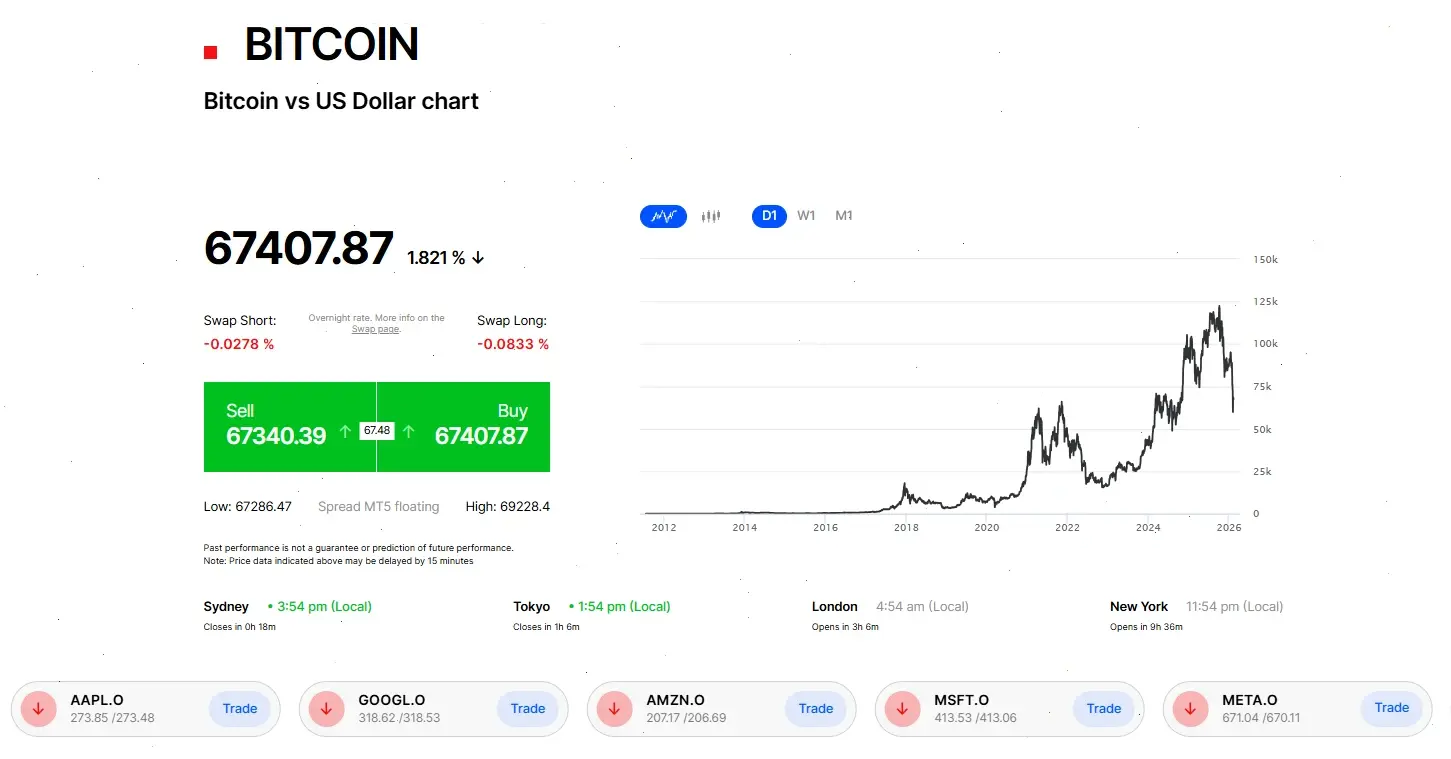
Unlike traditional currencies, Bitcoin operates under a fixed monetary supply model capped at 21 million coins. New Bitcoin issuance follows a predictable schedule known as the halving cycle, during which mining rewards are reduced approximately every four years.
Historically, halving events have influenced long-term market structure by reducing new supply entering circulation while demand continues to evolve. This programmed scarcity introduces unique supply-demand dynamics rarely observed in conventional financial markets.
Traders and analysts frequently study previous market cycles to identify accumulation phases, expansion periods, and consolidation ranges associated with Bitcoin's long-term price development.
Bitcoin Market Liquidity and Trading Structure
Bitcoin trades continuously across global markets, creating one of the most liquid digital asset ecosystems available to traders. The absence of centralized trading hours allows market reactions to geopolitical events, economic announcements, and sentiment shifts to occur in real time.
Liquidity is distributed across spot markets, derivatives exchanges, and CFD trading environments, enabling diverse trading approaches ranging from short-term momentum trading to long-term strategic positioning.
Market depth, order flow activity, and derivatives positioning increasingly influence short-term price movements, making technical analysis and risk management central elements of professional Bitcoin trading.
Institutional Adoption and Market Maturity
The evolution of regulated trading infrastructure has significantly changed Bitcoin's market profile. Institutional participation has expanded through regulated futures markets, custodial solutions, and exchange-traded investment products.
The launch of Bitcoin derivatives on regulated exchanges such as the CME (Chicago Mercantile Exchange) marked an important milestone, enabling institutional hedging and price discovery mechanisms similar to those used in commodity and currency markets.
As institutional capital participation grows, Bitcoin increasingly demonstrates characteristics of an emerging global asset class integrated into diversified investment portfolios.
Bitcoin Volatility as a Trading Mechanism
Volatility remains one of Bitcoin's most distinctive market characteristics. Price movements can occur rapidly due to shifts in market sentiment, liquidity imbalances, regulatory announcements, or macroeconomic developments.
For traders, volatility represents opportunity rather than risk alone. Active market participants utilize volatility-driven strategies including trend trading, breakout trading, and short-term speculative positioning.
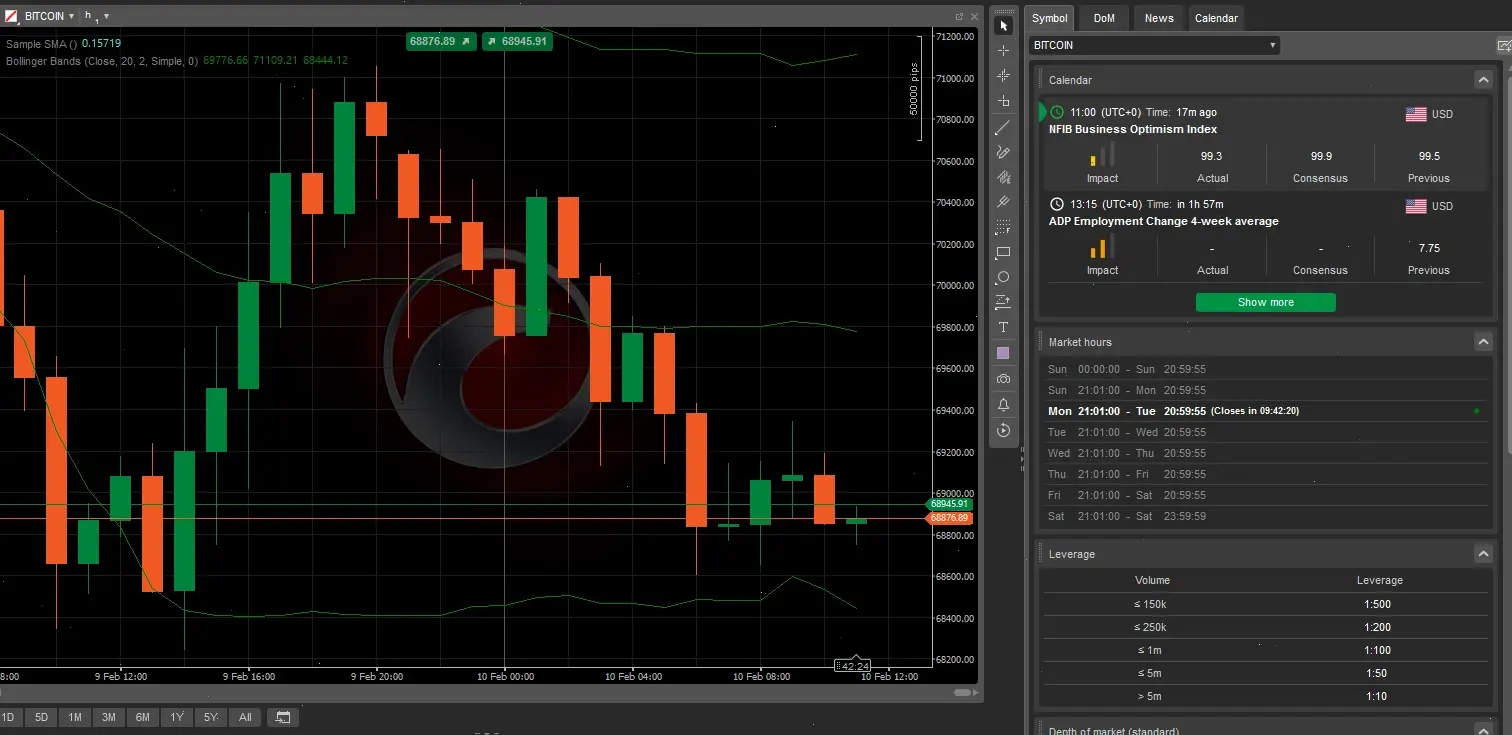
Understanding volatility regimes, support and resistance zones, and momentum indicators allows traders to adapt strategies to changing market conditions and manage exposure more effectively.
Trade Bitcoin CFDs in South Africa with FxPro
Bitcoin trading has become one of the fastest-growing financial activities in South Africa, attracting traders seeking exposure to cryptocurrency price movements without owning digital assets. FxPro offers regulated access to Bitcoin CFD trading through professional platforms, fast execution infrastructure, and flexible trading conditions designed for modern crypto markets.
Bitcoin CFDs allow traders to speculate on rising or falling BTC prices while using advanced risk management tools, real-time charts, and institutional-grade execution technology.
Risk Warning: Trading CFDs involves significant risk of loss and may not be suitable for all investors. Cryptocurrency markets are highly volatile and leveraged trading can amplify both profits and losses.
- Trade Bitcoin without owning cryptocurrency wallets
- Execution speed averaging 11ms
- Minimum deposit from $100 USD / 1700 ZAR
- Lot sizes starting from 0.01
- Desktop, web, and mobile trading platforms
Why Traders Choose FxPro for Bitcoin Trading
FxPro is an international broker operating since 2006 and serving clients across more than 170 countries. The broker provides institutional-grade trading infrastructure combined with retail trader accessibility.
| Broker Strength | Trader Advantage |
|---|---|
| Global Broker Since 2006 | Established trading reputation |
| Equinix Data Centers | Ultra-fast order execution |
| No Dealing Desk Model | Transparent pricing environment |
| Segregated Client Funds | Enhanced fund protection |
| Multi-Platform Trading | Flexible strategy execution |
What Is Bitcoin CFD Trading?
Bitcoin CFD trading allows traders to speculate on Bitcoin price movements without purchasing or storing the cryptocurrency itself. Instead of owning BTC, traders open contracts reflecting price changes and can profit from both upward and downward market movements.
How Bitcoin CFD Trading Works
- Open a Buy position if expecting Bitcoin price growth
- Open a Sell position if expecting price decline
- Use leverage to control larger positions
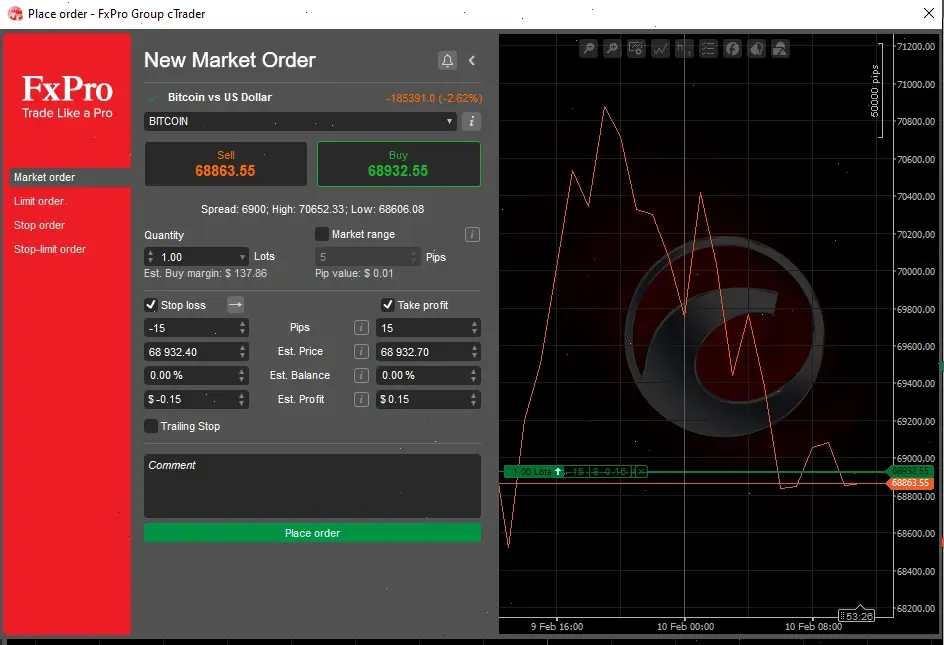
- Apply stop loss and take profit for risk control
Bitcoin Trading Conditions for South African Traders
South African traders can fund accounts using internationally supported payment systems and trade Bitcoin CFDs using USD or ZAR-based accounts. Registration and verification processes follow international financial compliance standards.
| Condition | Details |
|---|---|
| Minimum Deposit | $100 USD / approx. 1700 ZAR |
| Account Currencies | USD, EUR, ZAR |
| Execution Model | No Dealing Desk |
| Trading Access | Desktop, Mobile, Web |
| Market Availability | Cryptocurrency CFD trading |
How to Start Trading Bitcoin CFDs
Step 1 — Register Your Account
- Create an account using email and secure password
- Select South Africa as country of residence
- Enter phone number with +27 country code
- Choose preferred account currency
Step 2 — Verify Your Identity
Upload identification documents and proof of address. Verification normally completes within minutes to several hours.
Step 3 — Fund and Trade
Deposit funds, download your preferred trading platform, and access Bitcoin CFDs immediately after approval.
Bitcoin Trading Platforms
FxPro provides multiple trading environments suitable for different strategies and experience levels.
| Platform | Best For | Mobile Support |
|---|---|---|
| MetaTrader 4 | Beginner traders | iOS / Android |
| MetaTrader 5 | Advanced analysis | iOS / Android |
| cTrader | Scalpers & day traders | iOS / Android |
| FxPro Edge | Browser trading | Mobile web |
- Real-time Bitcoin charts
- 50+ technical indicators
- One-click trading
- Custom layouts and templates
How to Trade Bitcoin CFDs on FxPro
The trading interface displays Bitcoin CFDs within the Market Watch panel. Traders can analyze charts, place orders, and manage risk directly from the platform dashboard.
| Order Type | Purpose |
|---|---|
| Market Order | Immediate execution |
| Buy Limit | Enter on price pullback |
| Sell Limit | Enter at resistance |
| Buy Stop | Trade breakout movement |
| Sell Stop | Trade downward momentum |
Risk Management for Bitcoin Trading
Bitcoin markets experience strong price volatility. Effective risk management tools help traders maintain disciplined strategies.
| Tool | Function | Benefit |
|---|---|---|
| Stop Loss | Limits losses automatically | Capital protection |
| Take Profit | Locks profits | Emotion-free trading |
| Trailing Stop | Follows price movement | Trend capture |
| Position Sizing | Controls exposure | Risk consistency |
Who Bitcoin CFD Trading Is Suitable For
- Short-term traders seeking volatility
- Crypto investors hedging holdings
- Technical analysis traders
- Beginners practicing with demo accounts
Fees, Spreads and Trading Conditions
FxPro accounts start from a $100 USD minimum deposit with zero broker deposit fees. Trading costs depend on spreads and market liquidity.
| Parameter | Details |
|---|---|
| Minimum Deposit | $100 USD |
| Deposit Fees | No broker fees |
| Minimum Lot Size | 0.01 lots |
| Execution Type | No Dealing Desk |
| Trading Access | 24/7 market availability |
Education and Trading Support
FxPro provides structured learning resources helping traders understand cryptocurrency market behavior and platform functionality.
- Watch & Learn educational videos
- Live webinars and market analysis
- Platform tutorials
- Algorithmic trading resources
- Demo trading with virtual funds
Customer support is available 24/7 through live chat, email, and phone assistance.
❓ Bitcoin Trading FAQ
Is Bitcoin trading legal in South Africa?
Yes. Cryptocurrency trading is legal, and traders may access Bitcoin CFDs through internationally regulated brokers.
Can beginners trade Bitcoin CFDs?
Yes. Beginners can start using demo accounts before trading with real funds.
Do I need to own Bitcoin to trade?
No. Bitcoin CFDs allow speculation on price movements without owning cryptocurrency.
What is the minimum deposit?
The minimum deposit is $100 USD or approximately 1700 ZAR depending on currency selection.
Can I trade Bitcoin on mobile?
Yes. FxPro platforms support full mobile trading on iOS and Android devices.